Create a role for setting up a load balancer and web server dynamically

Greetings, fellow tech enthusiasts! I'm Shubham Rasal, but you might know me better as the SREngineered.
Over the last three years, I have immersed myself deeply in the intricate universe of DevOps and SRE. Along the way, I've brought life to various technologies and projects, utilizing everything from bash script automation to Kubernetes production clusters. My credentials include the Certified Kubernetes Administrator (CKA) and Ansible Certified Engineer titles, standing testament to my unwavering commitment to and understanding of our craft.
This blog is designed for kindred spirits who are passionate about engineering excellence. My goal is to share my experience, knowledge, and wisdom through tutorials, case studies, and Golang code examples that offer valuable solutions for navigating the continually evolving world of DevOps and SRE.
No matter where your interests lie within the vast landscape of DevOps/SRE, Automation, and Golang, this blog aims to offer valuable insights to help you elevate your skills and understanding. So, buckle in and join me on this journey into the thrilling world of cutting-edge engineering solutions!
When I'm not busy conjuring up elegant engineering solutions, I enjoy getting lost in the immersive worlds of movies and books. Feel free to connect with me on LinkedIn, Twitter, or through email.
ANSIBLE-8
Ansible role for setting up load balancer using HAProxy and webserver using Apache software.
Introduction 🤓
In this article, we will write a simple role for configuring HAPorxy software for load balancing which will dynamically add backend servers.
I have also covered what is a load balancer and how to write the playbook for configuring a load balancer on AWS using a playbook.
You can refer to the blog to know more about load balancer and configuration.
[How to configure Load Balancer and webserver on AWS using Ansible Playbook?
Configure Haproxy dynamically when a new webserver gets added using ansible.medium.com](https://medium.com/faun/how-to-configure-load-balancer-and-webserver-on-aws-using-ansible-playbook-60c22c0355ed "https://medium.com/faun/how-to-configure-load-balancer-and-webserver-on-aws-using-ansible-playbook-60c22c0355ed")
In this blog, we will focus more on writing and using the ansible role. This is the continuation of the below blog which configures web servers. Now we want to add a load balancer that will dynamically register the webservers as backend servers.
[Ansible: Write Ansible role to configure apache webserver
Write Ansible role to configure apache webserver on Redhat and Ubuntu.medium.com](https://medium.com/faun/ansible-write-ansible-role-to-configure-apache-webserver-9c08aaf66528 "https://medium.com/faun/ansible-write-ansible-role-to-configure-apache-webserver-9c08aaf66528")
Action plan 🔥
- Install Haproxy
- Configure load balancer
- Register backend servers that are mentioned in the inventory file.
- Use HAProxy and Apache roles to configure the web server and also register the server to HAProxy dramatically.
- Override default variables.
Let’s start the action ☄️
Initialize ansible role. Read more about “ansible-galaxy”
#create directory and change directory
$ mkdir roles
$ cd roles
#create ansible role
$ ansible-galaxy init haproxy
This command will create a folder structure for a role.
First, decide the variables we are going to use

lb_port_number: This variable is used for configuring haproxy. Clients will connect to this port number of haproxy.
lb_inventory_group: This variable is the name of the backend server group name in ansible inventory.
lb_backend_port_number: This variable is the value of the backend server port number.
Now we have declared the variables, Now we will add a configuration jinja template that will read variables from the defaults/main.yml file.
Also, register all the servers mentioned in the backend group of inventory.
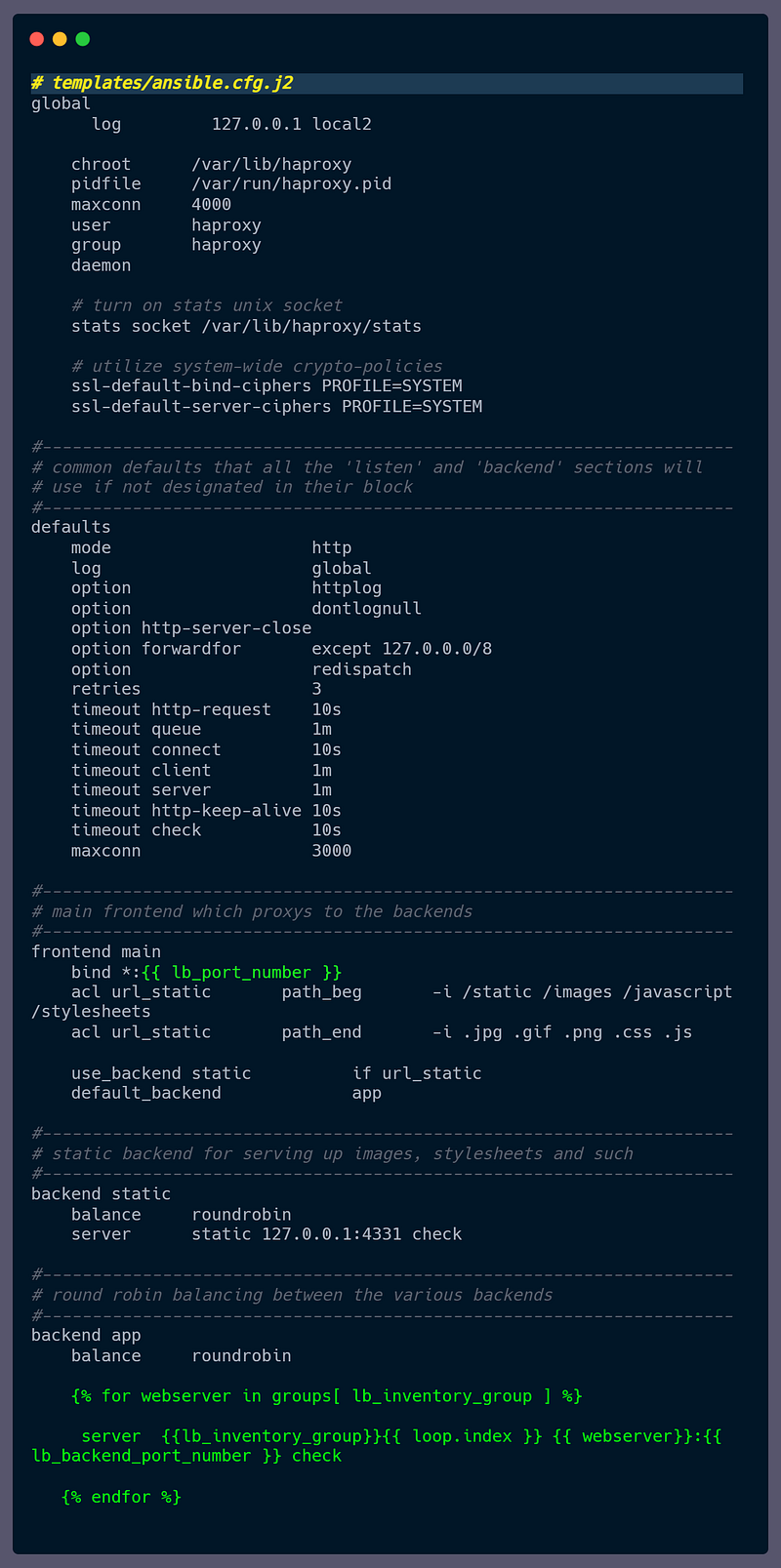
Now we have the configuration file ready, it’s time to write tasks for installing and transfer this template to a managed node.
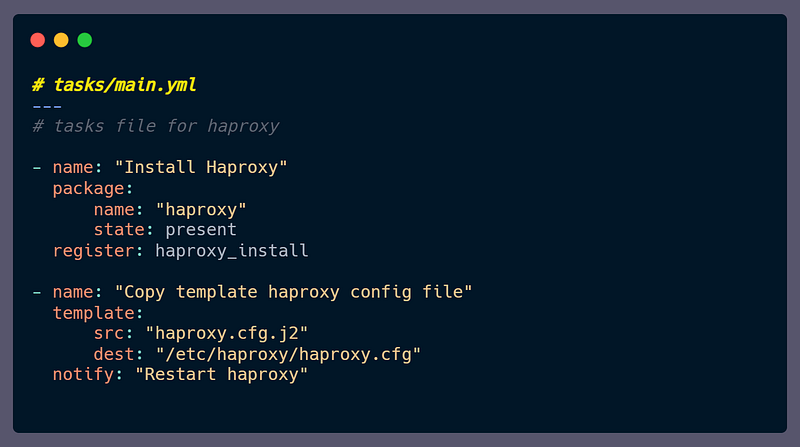
we have to restart the haproxy only when if there is any change or we add a new node in haproxy, for that you can notice we have called the “Restart haproxy” handler in the template task. we have to write handlers in handlers/main.yml file.

That’s it… We have written the simple ansible role for configuring haproxy.
Now we will use this haproxy role and apache rule. In such a way that, first we will configure webservers then we will register those web servers in haproxy load balancer as backends. If we have a case that, we have a new webserver then it will simply configure and also register its backend server dynamically.
Use the roles
Create an inventory file that will have two groups for load balancer and backend servers.

I have three managed nodes. We want to configure two of them as a webserver and one as the load balancer.
Create one file and name it as ‘inventory’. Test the connection using the ping module.

Write a playbook that will use both the roles.

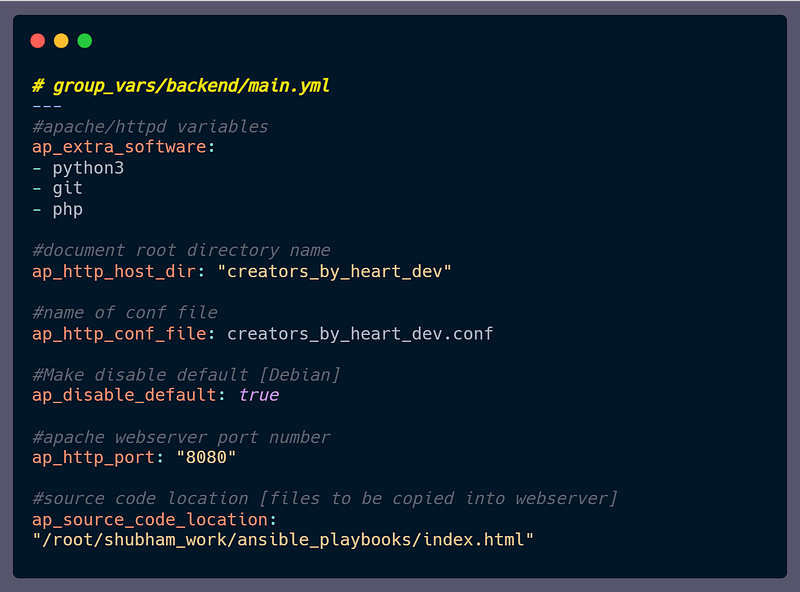
Now we want to override default variables used in roles. There are multiple ways to do that but we will use the group_vars directory.
Define webservers variable in group_vars/backend/main.yml file.
Define webservers variable in group_vars/load_balancer/main.yml file.

write some demo file to test our load balancer is working or not.

The above file print the IP address of the managed server, so that we can test it is balancing the load.
Again, let’s see what the will be directory structure?

Now it's time to run and test our playbook.
$ ansible-playbook webserver_lb.yml -i inventory

Output

You can find the above playbook on this GitHub repository. Bookmark or star it which helps to keep me motivated.
[ShubhamRasal/ansible-playbooks
You can find the above-used file here. check it out and don’t forget to mark a start. It helps me to maintain my motivation. Thank you | github.co](https://github.com/ShubhamRasal/ansible-playbooks/tree/master/Roles/myapache "https://github.com/ShubhamRasal/ansible-playbooks/tree/master/Roles/myapache")
If you have any doubts or something improvement needed in this blog, please feel free to reach out to me on my LinkedIn account.
I hope you learned something new and find ansible more interesting.
Let me know your thoughts about ansible and how do plan to use ansible?
Thank you…
About the writer:
Shubham loves technology, challenges, is open to learning and reinventing himself. He loves to share his knowledge. He is passionate about constant improvements.
He writes blogs about Cloud Computing, Automation, DevOps, AWS, Infrastructure as code.
Visit his Medium home page to read more insights from him.