Deploy the WordPress application on Kubernetes and AWS RDS using terraform

Greetings, fellow tech enthusiasts! I'm Shubham Rasal, but you might know me better as the SREngineered.
Over the last three years, I have immersed myself deeply in the intricate universe of DevOps and SRE. Along the way, I've brought life to various technologies and projects, utilizing everything from bash script automation to Kubernetes production clusters. My credentials include the Certified Kubernetes Administrator (CKA) and Ansible Certified Engineer titles, standing testament to my unwavering commitment to and understanding of our craft.
This blog is designed for kindred spirits who are passionate about engineering excellence. My goal is to share my experience, knowledge, and wisdom through tutorials, case studies, and Golang code examples that offer valuable solutions for navigating the continually evolving world of DevOps and SRE.
No matter where your interests lie within the vast landscape of DevOps/SRE, Automation, and Golang, this blog aims to offer valuable insights to help you elevate your skills and understanding. So, buckle in and join me on this journey into the thrilling world of cutting-edge engineering solutions!
When I'm not busy conjuring up elegant engineering solutions, I enjoy getting lost in the immersive worlds of movies and books. Feel free to connect with me on LinkedIn, Twitter, or through email.
Deploy the WordPress application on Kubernetes and AWS RDS using terraform
Infrastructure as code using Terraform, which automatically deploys the WordPress application using AWS RDS service.
What do we want to do?
Deploy the WordPress application on Kubernetes and AWS using terraform including the following steps;
1. Write an Infrastructure as code using Terraform, which automatically deploy the WordPress application
2. On AWS, use RDS service for the relational database for WordPress application.
3. Deploy WordPress as a container on top of Minikube.
4. The WordPress application should be accessible from the public world if deployed on AWS or through workstation if deployed on Minikube.
My main intention is to show how we can use the RDS service of AWS in our WordPress application. Here I am using WordPress application on Kubernetes over Minikube.
Pre-requisite :
- AWS account.
- Download AWS CLI and Configure it.
- Download terraform. Download
- Download Minkube.
Let’s Start…
1. Configure the Providers
We want to use two services AWS and Kubernetes. for that we need to use AWS and Kubernetes providers in Terraform.

Providers
2. Start Minikube
To start Minikube open VirtualBox and start manually or give the command
$ minikube start

minikube start
3. Create RDS Service
We want to use RDS to store the WordPress database. so we will use MYSQL community edition.
first, we will create a security group that will allow traffic only for MySQL port.

Security Group
Now we will create an RDS instance for MYSQL.

RDS
Here we have taken 20GB Memory and t2.micro type for RDS instance. Added username and password attributes. You need to put your specifications. or you can also use a variable to take interactive input.

3. Launch WordPress on K8s
Here, for this demo, I am using locally installed minikube but you can use services like EKS or target services on AWS.
Create deployment for WordPress.
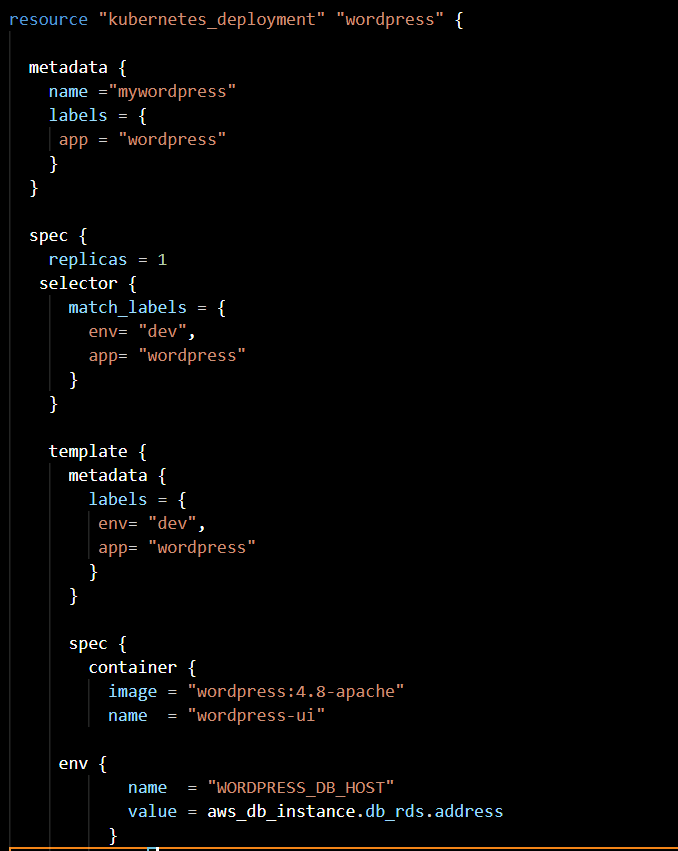
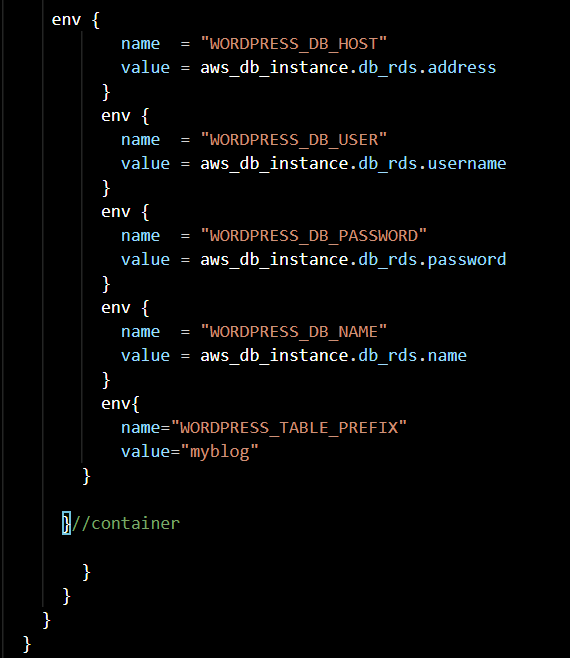
using deployment we will achieve high availability. I have selected WordPress 4.8-apache container. The main part here is we are setting some variables of WordPress like WORDPRESS_DB_HOST, WORDPRESS_DB_USER, WORDPRESS_DB_PASSWORD, WORDPRESS_DB_NAME. To set these properties we are getting values to form the RDS instance. but to access WordPress, we need to expose it.
Expose WordPress.

expose
Above kubernetes_service resource selects our WordPress pod and give service as Nodeport and exposing it.
3. Check output

output
The above code gives the URL and port number where WordPress is exposed. To get the first half of the URL which I had put statically here. you can check using below command
$ minikube ip
Select language and add admin details. after that, you will see the login tab like below.

login
Add Post
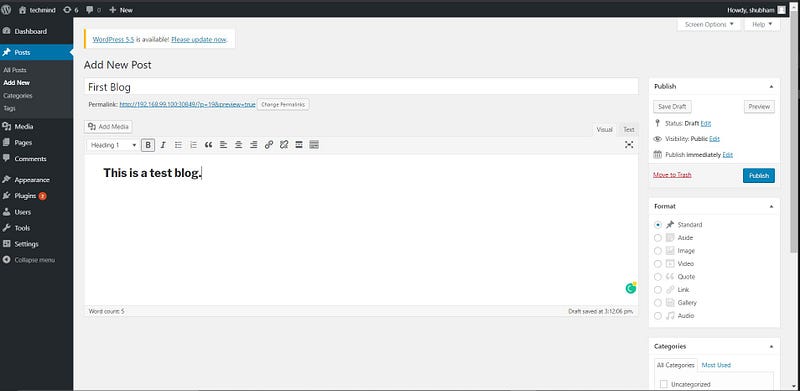
Publish and Check.
You will see the output like above.
Check the solution
Now delete the pod manually and it will be launch again…
Again check WordPress our previous blog exists or not.


Conclusion
We have successfully created Infrastructure as Code for deploying the WordPress application on Kubernetes and AWS RDS using terraform
I want to express my gratitude for everything that Mr. Vimal Daga sir have helped me achieve this knowledge and thank you for the cheering and mentoring us…..
If you like my efforts then don’t forget to give feedback in the comment box. Feel free to ask questions and doubts in the comments.
#LEARN — SHARE — GROW